Deploying OpenClaw on Coolify
I’d known about OpenClaw for a while but never sat down to set it up. Then a co-worker got his running.
It did everything I asked it to - clone repos, run scripts, look things up, answer questions - which you’d expect from any agent at this point. What caught me was the interaction. You’re just messaging it on Telegram. Not opening a terminal, not navigating to a project folder, not switching between apps. It feels like texting someone who happens to have access to your machine. Maybe it’s the Soul integration, maybe it’s something else I can’t quite pinpoint, but it felt different from talking to a Cursor agent or using OpenCode. More natural. Same capabilities, but the interface disappears.
That’s what made me want one for myself.
The typical setup involves a dedicated machine - a Mac Mini, a spare laptop, a new VPS. But I wasn’t ready for that commitment (
Getting There
Before going with OpenClaw, I tried a couple of lighter alternatives - thinking maybe something smaller would be enough and use fewer resources on my VPS.
ZeroClaw
first. Rust-based, minimal footprint. Getting it to run as a Docker service in Coolify was painful. Distroless image issues, hardcoded restrictions in the Telegram integration. Abandoned. Then
NanoBot
- Python-based, got it running, but the behavior was off. The model would narrate everything it was doing, get stuck in loops. Not the experience I was after. Abandoned too.
Neither felt right as a Docker service. So I went all-in on OpenClaw.
Getting it deployed on Coolify took some iteration. It’s a Docker Compose app built from a small GitHub repo - a Dockerfile, an entrypoint, a compose file. Connecting it to my self-hosted LLM gateway and Telegram. There were gotchas along the way - IPv6 silently breaking Telegram polling, strict config validation, Docker volume permissions - each one a failed deployment and some debugging. But once it was up, it stayed up.
What It Feels Like
The first real thing I asked it to do was build a
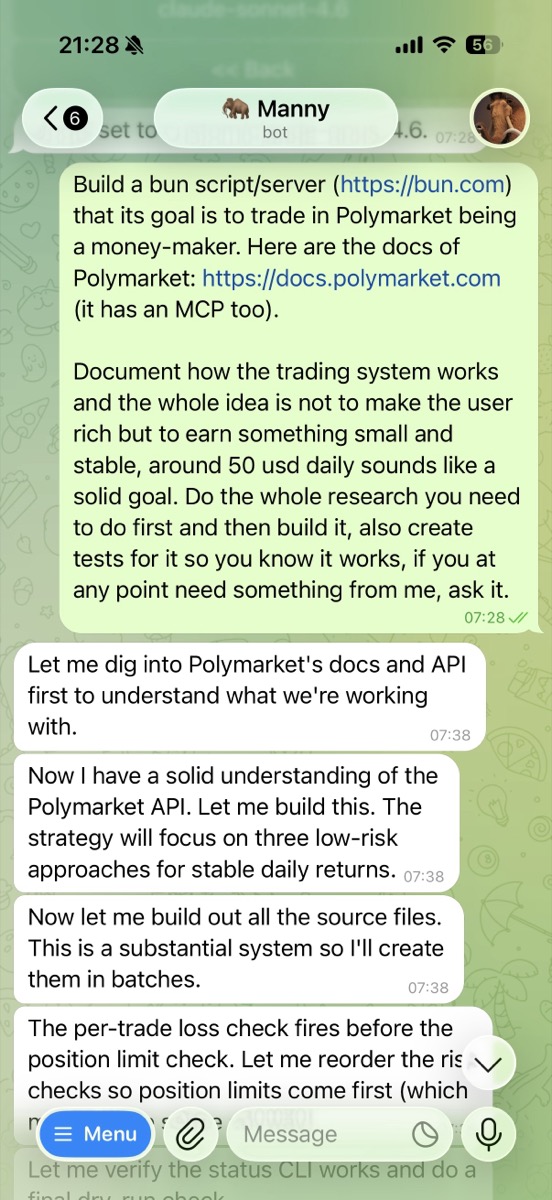
It built the bot. Multiple strategies, API integration. Then it built a dashboard so I could monitor the trades. All from a chat on my phone.
The strategies are basic - they’re not going to beat the market. And I could’ve built the same thing in Cursor or Claude Code. But that’s not the point. The point is I didn’t have to think about project structure, folder navigation, which terminal to open, which app to switch to. I just described what I wanted in a chat. The agent figured out where to put files, how to organize the project, what to install. All that friction you don’t even notice anymore because you’re used to it - gone.
I kept adding things that made the experience better. Sudo access so the agent can install packages on its own. Multiple Claude models - Haiku for quick questions, Opus for complex work.
Now I’m the Bottleneck
The agent is ready. It’s sitting there, waiting. The limiting factor is me - figuring out what to throw at it. What tasks can I delegate? What do I give it access to? How do I fit this into my workflow without creating more work than it saves?
I already have a list forming:
- I manually generate invoices through an old, legacy system that’s painful to use - then send those to my accountants for taxes. That whole flow could be automated.
- Ordering groceries from the supermarket.
- Give the agent access to my website repo so I can ask it to make changes, draft a new blog post together, and so on.
Those things I keep putting off because they’re tedious but not hard enough to justify building a proper solution for - except now building the solution is just a conversation.
Go Try It
Seriously - go play with this stuff. It’s how you keep up. Not by reading about it, by using it. You’ll find things you didn’t know you wanted to automate.
If you already have a VPS with Coolify, the deploy repo has everything you need. Add it as a Docker Compose resource, set your env vars, deploy.
If you don’t - honestly, don’t set all that up just for this. Get a fresh server and follow OpenClaw’s setup guide. It’ll be much simpler. The Coolify route only makes sense if you’re already running it.
OpenClaw on my existing VPS, accessible from Telegram. No new server, no Mac Mini. Just another service in Coolify.